How to Use LinkedIn to Find a Remote Job
Remote work is one of the few career trends that survived the hype cycle. While social media often exaggerates what remote life looks like, companies around the world continue to hire remote employees, contractors, and freelancers every day. The problem is that most people use LinkedIn in a very passive way. They search for a few jobs, click “Easy Apply” dozens of times, wait for responses that never arrive, and eventually conclude that entry-level remote jobs are impossible to get.
In reality, the people who consistently find remote work often use LinkedIn very differently. They treat it as a search engine, a networking platform, a recruiter database, and a company research tool all at the same time. Instead of competing only through applications, they actively position themselves where recruiters and hiring managers can find them. Many are already working in location-independent careers that allow them to work from anywhere while building valuable professional networks online.
If you’re trying to figure out how to use LinkedIn to find a remote job, this guide focuses on practical strategies rather than generic career advice. By the end, you’ll have a system that goes far beyond simply clicking the Apply button.
Why LinkedIn Is Still One of the Best Places to Find Remote Jobs
Every year new job boards appear claiming to be the best place for remote work. Some are useful. Others disappear after a few months. Meanwhile, LinkedIn remains one of the largest hiring platforms in the world.
The biggest advantage is that LinkedIn is not only a job board. It is also where recruiters spend a significant portion of their working day. According to LinkedIn Talent Solutions, recruiters use LinkedIn to search for and engage potential candidates directly. When companies decide to hire remotely, recruiters often search LinkedIn before posting jobs publicly. In many cases, they actively look for candidates instead of waiting for applications.
This creates opportunities that don’t exist on traditional job websites. You can see who works at a company, who posted the vacancy, who manages the team, and sometimes even who the recruiter is. That level of transparency makes it easier to build relationships instead of remaining one anonymous application among thousands.
LinkedIn is also particularly useful for international hiring. Many remote-first companies recruit globally and use LinkedIn as their primary hiring platform. This means that people interested in location-independent careers, digital nomad lifestyles, or international remote work often find opportunities that never appear on local job boards. It can also be useful to look beyond traditional employment at alternatives such as remote text-based jobs with no experience, particularly if your priority is finding flexible work you can do from different countries.
For readers exploring remote careers, it can also be helpful to understand the kinds of roles that actually support this lifestyle. Our guide to jobs digital nomads actually do breaks down the most common professions behind location-independent work.
Another advantage is direct access. On many job websites, you only see the position. On LinkedIn, you can often identify the hiring manager, follow recruiters, interact with employees, and learn about a company before submitting an application. Those small advantages can significantly increase your chances of getting noticed, especially when competition for jobs has become increasingly intense and a standard application alone may not be enough to reach a recruiter.
How to Find Remote Jobs on LinkedIn
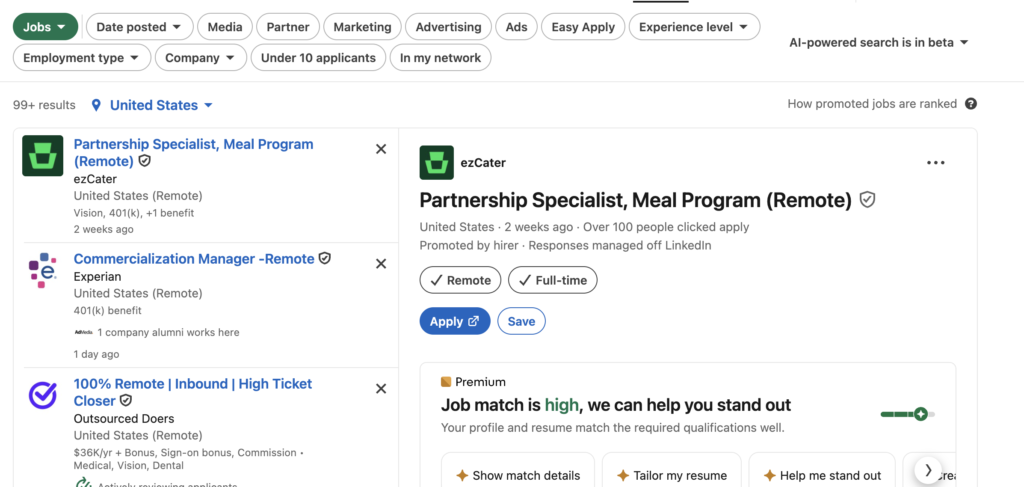
Many people search for remote jobs on LinkedIn without using even half of the platform’s available filters. As a result, they either see irrelevant listings or compete for the same highly visible jobs everyone else is applying for.
The most effective approach starts with the Jobs tab.
After opening Jobs, enter a job title rather than simply typing “remote jobs.” Generic searches usually produce lower-quality results. Specific searches tend to be much more useful.
For example:
Once results appear, activate the Remote filter. This removes office-based positions and hybrid roles that require local attendance.
After that, use experience filters carefully. Many beginners automatically select Entry Level. While this sounds logical, some genuinely beginner-friendly jobs are often classified as Associate instead. Restricting yourself to only Entry Level positions may cause you to miss good opportunities.
Location filters also require attention. Many people assume remote means global. Unfortunately, this isn’t always true. Some companies advertise remote positions but require candidates to live in specific countries for tax, legal, or payroll reasons. Understanding how employers approach hiring in different regions can save a lot of frustration, especially when navigating competitive job markets where thousands of candidates may be applying for the same roles.
For this reason, always read the location requirements carefully. Some listings may say:
Remote location labels can mean:
• Remote – United States
• Remote – Europe
• Remote – United Kingdom
• Remote – Worldwide
These distinctions matter enormously if you’re planning a location-independent career.
If you’re currently searching for your first opportunity, our guide on remote job opportunities for beginners covers additional platforms beyond LinkedIn.
Save Searches and Create Alerts
One of LinkedIn’s most underused features is the ability to save searches.
Most job seekers repeat the same search manually every day. LinkedIn can do that work automatically.
After creating a useful search, click Save Search and enable alerts. This allows you to receive notifications when new positions matching your criteria appear.
This matters because remote jobs often attract hundreds of applicants within the first few days. Applying early frequently improves visibility.
Instead of spending hours searching, you can let new opportunities come to you.
Use Job Titles Strategically
Many remote positions exist under unexpected titles.
For example, someone searching only for “remote writer” might miss opportunities listed as:
- Content Specialist
- Content Marketing Associate
- Editorial Assistant
- Copywriter
- Content Manager
Similarly, customer support positions might appear as:
- Customer Success Representative
- Client Support Specialist
- Customer Experience Associate
- Member Support Agent
The wider your understanding of industry terminology, the larger your pool of potential opportunities becomes.
LinkedIn Search Strategies Most People Never Use
The biggest difference between casual LinkedIn users and successful remote job seekers is usually search behaviour.
Most people type a simple phrase into the search bar and stop there. More experienced users treat LinkedIn like a professional search engine.
Boolean Searches
Boolean searches allow you to combine multiple keywords.
For example:
("Content Writer" OR Copywriter) AND RemoteThis search tells LinkedIn to display either Content Writer or Copywriter positions that are remote.
Another example:
("Customer Support" OR "Customer Success") AND RemoteThis broadens the search without sacrificing relevance.
Boolean searches are particularly useful because companies often use different job titles for similar responsibilities.
Search Companies, Not Just Jobs
Many people focus entirely on vacancies and ignore companies.
This is a mistake.
Some remote-first companies hire continuously even when they do not have public listings.
Search terms such as:
- Remote-first companies
- Distributed teams
- Global hiring
- Work from anywhere
can help identify organisations that regularly recruit remote talent.
Follow these companies. Monitor employee growth. Watch for hiring announcements.
Sometimes you’ll discover opportunities before official job postings appear.
Follow Hiring Managers
Most job seekers follow companies.
Fewer follow hiring managers.
Search for titles such as:
- Head of Marketing
- Customer Success Manager
- Talent Acquisition Manager
- Recruitment Lead
- Head of Operations
When these people announce growth plans or team expansion, new opportunities often follow.
Additionally, regularly engaging with their content can help your name become familiar before you ever submit an application.
Search by Industry
Rather than focusing only on job titles, explore industries that frequently hire remotely.
Examples include:
- SaaS
- Technology
- Digital marketing
- Education technology
- E-commerce
- Recruitment
- Online publishing
- Remote customer support
Some industries have embraced remote work far more aggressively than others.
Understanding where remote hiring is concentrated can dramatically improve your search efficiency.
The biggest takeaway is that LinkedIn rewards active users. People who simply apply often struggle. People who search creatively, follow recruiters, monitor companies, and build visibility usually uncover far more opportunities.
In the next section, we’ll cover how to find true work-from-anywhere jobs on LinkedIn, how digital nomads use the platform, and how recruiters actually search for candidates behind the scenes.
How to Find Work-From-Anywhere Jobs on LinkedIn
One of the biggest mistakes people make when searching for remote jobs is assuming that all remote positions are location-independent.
They aren’t.
A company may advertise a role as remote while still requiring employees to live in a specific country. In some cases, the company may only hire within certain states, regions, or tax jurisdictions. This distinction becomes especially important for digital nomads and people planning to live abroad.
If your goal is flexibility rather than simply working from home, you should focus on work-from-anywhere positions rather than standard remote jobs.
The easiest way to identify these opportunities is by reading job descriptions carefully. Phrases such as:
Look for phrases such as:
• Work from anywhere
• Worldwide remote
• Global hiring
• International candidates welcome
• Distributed team
• Location independent
usually indicate a higher degree of flexibility.
On the other hand, descriptions that say:
Be cautious if a listing says:
• Remote within the US
• Remote within Europe
• Candidates must reside in Canada
• Must be eligible to work in Australia
are technically remote but not truly location-independent.
Companies that frequently offer work-from-anywhere opportunities include many SaaS businesses, startup companies, fully distributed organisations, and online service providers. Marketing agencies, content businesses, software companies, online education platforms, and global customer support teams often hire internationally.
For aspiring nomads, these positions can become the foundation of a long-term location-independent lifestyle. However, it is important to remember that location freedom usually comes after proving reliability. Employers may be comfortable hiring remotely, but they still want dependable people who communicate well and deliver consistent results. For many people, starting a location-independent career begins with building those skills long before they ever book a one-way ticket abroad.
How to Find Digital Nomad Jobs on LinkedIn
People often search for “digital nomad jobs” as though they are a separate category of employment.
In reality, most digital nomads simply work in professions that can be performed online.
If you’re wondering how to find digital nomad jobs on LinkedIn, start by focusing on industries that naturally support remote work.
Some of the most common include:
The advantage of these professions is that employers already understand how to manage them remotely.
When searching LinkedIn, try combining industry keywords with remote terms:
Remote SEO Specialist
Remote Content Writer
Remote Customer Success
Remote Recruiter
Remote Marketing Manager
Remote Account Executive
The more specific your search, the more relevant your results will become.
If you’re unsure what kinds of careers support long-term travel, our guide to what jobs digital nomads actually do explores the most common professions behind the lifestyle.
It’s also worth remembering that many successful nomads didn’t start remotely. Some transitioned from traditional office jobs, while others built freelance experience gradually before securing remote positions. LinkedIn can help at every stage of that journey.
How to Find Recruiters on LinkedIn
Most people use LinkedIn as a job board.
Recruiters use LinkedIn as a database.
Understanding this difference can completely change your results.
When recruiters receive hundreds of applications, they often stop waiting for candidates and start searching for them directly. That means your profile may be discovered long before you apply anywhere.
Search for Recruiters Directly
Start by searching terms such as:
Remote Recruiter
Talent Acquisition Specialist
Technical Recruiter
Marketing Recruiter
Global Recruiter
Remote Hiring Manager
Switch to the People filter.
You will immediately discover thousands of professionals whose job is finding candidates.
Many of them regularly publish:
- Open positions
- Hiring announcements
- Recruitment campaigns
- Industry advice
Following these people can expose you to opportunities that never reach job boards.
Follow Recruitment Agencies
Recruitment agencies remain one of the most overlooked sources of remote work.
Companies such as:
- Robert Half
- Michael Page
- Hays
- Korn Ferry
- Crossover
frequently advertise remote positions through recruiters before publishing them elsewhere.
Following these agencies and interacting with relevant content can increase visibility.
Understand How Recruiters Search
Most recruiters don’t search for “good candidates.”
They search for keywords.
Imagine a recruiter hiring a remote content writer.
They may search:
Content Writer SEO Blogging CopywritingIf those keywords are missing from your profile, you may never appear in their results.
This is why profile optimisation matters so much. LinkedIn functions more like Google than most people realise.
Build Familiarity Before Applying
One underrated strategy is becoming familiar before sending an application.
For example:
- Follow recruiters.
- Like relevant posts.
- Leave thoughtful comments.
- Share industry insights.
When your name appears repeatedly, you become more memorable.
No, this won’t magically get you hired.
However, it can make your application feel less anonymous.
Messages to Recruiters That Actually Get Responses
Most recruiter messages fail for one simple reason.
They immediately ask for a job.
Recruiters receive dozens of these messages every day.
A better approach is to start conversations professionally and make it easy for recruiters to understand who you are.
Bad Example
Hi. Do you have any remote jobs for me?This provides no context, no skills, and no reason to respond.
Better Example
Hi Sarah,

I came across your profile while researching remote customer support opportunities.

I have experience working with clients, handling online communication, and solving customer issues. I'm currently exploring remote roles and would love to connect.

Thank you for your time.

Best regards,
Anna
Notice the difference.
The message feels professional rather than demanding.
Following Up After Applying
Hi James,

I recently applied for the Remote Content Writer position at ABC Company.

The role strongly matches my background in content creation and SEO, so I wanted to introduce myself personally and express my interest.

Thank you for your consideration.

Best regards,
Anna
Asking About Future Opportunities
Hi Maria,

I noticed your company regularly hires remote marketing professionals.

While I didn't see a current opening that matches my background, I would love to stay connected and learn about future opportunities.

Thank you.

Best regards,
Anna
This approach often works better than immediately requesting a job.
What Doesn’t Work
Avoid:
- Sending the same message to hundreds of recruiters.
- Asking for jobs without context.
- Writing extremely long messages.
- Immediately requesting referrals.
- Following up every few days.
Recruiters are busy. Respecting their time increases your chances of receiving a response.
In the next section, we’ll cover profile optimisation, the LinkedIn mistakes that quietly hurt remote job seekers, and a practical weekly routine that can dramatically improve your visibility over time.
LinkedIn Profile Changes That Increase Your Chances
Many job seekers spend hours applying for positions while ignoring the thing recruiters actually see first: their profile.
This creates a strange situation. Someone might have the right skills and experience but still struggle to get interviews because their LinkedIn profile doesn’t communicate those strengths clearly.
Recruiters rarely read every profile from top to bottom. Instead, they scan quickly, looking for signals that match the position they’re hiring for. The easier you make their job, the more likely they are to contact you.
Your Headline Matters More Than Most People Realise
One of the most common mistakes is using generic headlines such as:
Open To Workor
Looking For OpportunitiesThese headlines tell recruiters almost nothing.
A stronger headline includes both your profession and relevant keywords.
For example:
Content Writer | SEO Specialist | Remote Workor
Customer Support Specialist | CRM Experience | Remote TeamsThink of your headline as a search result. Recruiters often see it before they see anything else.
The About Section Should Not Read Like a CV
Many About sections are either empty or filled with corporate buzzwords.
Instead, use the space to explain:
A strong About section should explain:
• What you do
• What industries you’ve worked in
• What skills you bring
• Why you’re interested in remote work
Write like a human being. Imagine you’re introducing yourself to somebody at a professional event rather than writing a corporate biography. If you’re struggling to make your CV sound natural, using ChatGPT to rewrite your CV without losing your own voice can help you clean up the wording without turning it into generic corporate language.
Keywords Matter
LinkedIn search works similarly to Google.
Recruiters search for skills.
If your profile doesn’t contain the terms they’re searching for, you may never appear in results.
For example, a recruiter searching for a remote content writer might use:
SEO
Blogging
Content Writing
WordPress
Copywriting
If those skills appear naturally throughout your profile, your visibility improves.
Build a Featured Section
The Featured section remains one of LinkedIn’s most underused tools.
If you have:
- Writing samples
- Portfolio projects
- Personal websites
- Case studies
- Freelance work
place them here.
Even beginners can benefit.
A simple Google Drive portfolio often performs better than having nothing at all.
Make Your Experience Section Specific
Avoid vague descriptions.
Instead of:
Handled customer service tasks.Try:
Resolved customer inquiries through email and live chat while maintaining a 95% satisfaction score.Specificity creates credibility.
Use a Professional Photo
No, you don’t need a studio photographer.
However, clear lighting, a simple background, and a professional appearance help significantly.
Profiles without photos generally receive less engagement and fewer recruiter interactions.
LinkedIn Mistakes That Hurt Remote Job Seekers
While many people focus on tricks and hacks, avoiding mistakes often produces faster results.
Applying Without Networking
This is probably the most common mistake.
A candidate applies for 200 jobs.
A recruiter never sees them.
Meanwhile, another candidate interacts with employees, follows hiring managers, and sends a thoughtful message before applying.
Who gets remembered?
Usually the second person.
Generic Profiles
Recruiters want clarity.
If your profile could describe ten different professions, it probably describes none of them effectively.
Choose a direction.
Make it obvious what type of work you’re looking for.
Sending Spam Messages
Recruiters can recognise copy-paste outreach immediately.
Messages that look automated are usually ignored.
Personalisation doesn’t require writing essays.
Even mentioning a company, role, or recent hiring announcement can dramatically improve response rates.
Being Invisible
Many people create LinkedIn profiles and disappear.
Months later they wonder why nobody contacts them.
LinkedIn rewards activity.
This doesn’t mean posting motivational quotes every day.
It means participating occasionally.
Comment.
Share industry insights.
Engage with people.
Stay visible.
Ignoring Relationships
One of the biggest advantages of LinkedIn is access to people.
Yet many users treat it exclusively as a job board.
The strongest opportunities often come through relationships rather than applications.
LinkedIn Tips for Beginners Looking for Remote Jobs
Many people searching for LinkedIn remote jobs for beginners assume they need years of experience before anyone will hire them remotely.
That’s rarely true.
What employers usually want is evidence that you can solve problems, communicate clearly, and work independently.
Build Small Proof Projects
If you’re interested in content writing:
Write articles.
If you’re interested in SEO:
Create a simple website.
If you’re interested in social media:
Manage a small project.
Experience doesn’t always have to come from a formal employer.
Become Easier to Find
Recruiters cannot contact people they cannot discover.
Therefore:
To improve your visibility:
• Complete your profile
• Add skills
• Use relevant keywords
• Connect with people in your target industry
Visibility matters.
Develop Remote-Friendly Skills
Many remote jobs value:
- Communication
- Organisation
- Time management
- Problem solving
- Written communication
These skills transfer across industries.
Focus on Momentum
The first remote interview matters more than the perfect remote job.
The first freelance project matters more than endless preparation.
The first client matters more than another month of research.
Progress usually beats perfection.
A Practical Weekly LinkedIn Routine
Many people spend hours scrolling LinkedIn without accomplishing anything.
A simple routine is usually more effective.
Monday
Spend 30 minutes reviewing new remote jobs.
Save promising opportunities.
Apply to the strongest matches.
Tuesday
Connect with recruiters and hiring managers.
Send a few personalised connection requests.
Wednesday
Improve one section of your profile.
Update skills.
Add projects.
Refine descriptions.
Thursday
Comment on industry posts.
Engage with people in your target field.
Increase visibility.
Friday
Follow up on applications submitted earlier in the week.
Check recruiter messages.
Review new opportunities.
Weekend
Learn something useful.
Complete a small project.
Expand your portfolio.
Prepare for the following week.
The goal isn’t to spend ten hours per day on LinkedIn.
The goal is consistency.
Thirty focused minutes each day often outperform random bursts of activity.
For people still searching for their first opportunity, our guide on where to find remote jobs with no experience covers additional platforms beyond LinkedIn.
At the same time, remember that remote work isn’t always as glamorous as social media suggests. Many remote workers eventually struggle with isolation, which is why understanding the realities of working from home loneliness can be just as important as finding the job itself.
Similarly, if you’re pursuing remote work to build a location-independent lifestyle, it’s worth exploring affordable destinations for digital nomads before making relocation plans. And while career flexibility can improve quality of life, it does not automatically eliminate stress. If you’re currently focused on finding work quickly, recognising the early signs of job burnout remains essential regardless of where you work.
FAQ
How do I find remote jobs on LinkedIn?
Use the Jobs tab, apply the Remote filter, create saved searches, set job alerts, and search specific job titles rather than generic terms such as “remote work.”
Is LinkedIn good for remote jobs?
Yes. LinkedIn remains one of the best platforms for remote hiring because recruiters actively search for candidates, companies publish remote vacancies, and professionals can network directly with hiring managers.
How do recruiters find candidates on LinkedIn?
Recruiters typically search using keywords, skills, job titles, industries, and experience levels. Profiles that contain relevant keywords are more likely to appear in recruiter searches.
Can beginners find remote jobs on LinkedIn?
Yes. Customer support, recruiting, sales, content writing, virtual assistance, and administrative positions often provide entry points for people with limited experience.
What are the best LinkedIn tips for remote jobs?
Use specific keywords, optimise your headline, build a strong About section, create job alerts, connect with recruiters, engage with industry content, and follow up professionally after applying.
How do I find work-from-anywhere jobs on LinkedIn?
Look for companies that use terms such as “worldwide remote,” “global hiring,” “distributed team,” or “work from anywhere.” Always verify location requirements in the job description.
Explore the Remote Work & Careers Hub
Discover more practical guides about remote jobs, hybrid work, career growth, burnout and the realities of building a career outside the traditional office.
Explore the Remote Work & Careers Hub →This article combines personal experience, independent editorial research, conversations with recruiters, and observations gathered while using LinkedIn to search for remote work opportunities and study how companies actually hire remote employees.
Research sources included:
- My own experience using LinkedIn to search for remote jobs, connect with recruiters, build professional networks, and apply for remote positions.
- Conversations and message exchanges with recruiters, hiring managers, and remote workers across multiple industries.
- Community discussions, hiring experiences, and career advice shared on Reddit remote work, digital nomad, freelancing, and job search communities.
- Research published through LinkedIn Talent Solutions regarding recruiter behaviour, hiring trends, candidate searches, and remote recruitment practices.
- Direct analysis of LinkedIn job listings, recruiter profiles, hiring manager activity, company pages, and remote-first employers.
- Personal observations of how successful remote workers, digital nomads, freelancers, and expats use LinkedIn to discover opportunities and build professional visibility.
The goal of this article is to provide practical guidance on how to use LinkedIn to find a remote job, how recruiters actually search for candidates, how remote workers build visibility on the platform, and what strategies can improve the chances of getting interviews in an increasingly competitive remote job market.

Founder & Editor
Founder of The City Theory, writing about digital nomad lifestyle, modern city culture, remote work, travel experiences, psychology and human behaviour around the world.